
在上一篇 [[讓 LangGraph Agent 使用工具查詢外部資料]] 中,我們讓模型在顧客詢問特定商品時呼叫 get_product_spec 查詢規格。但在真實的商城客服中,系統通常需要同時處理多種不同特性的需求:
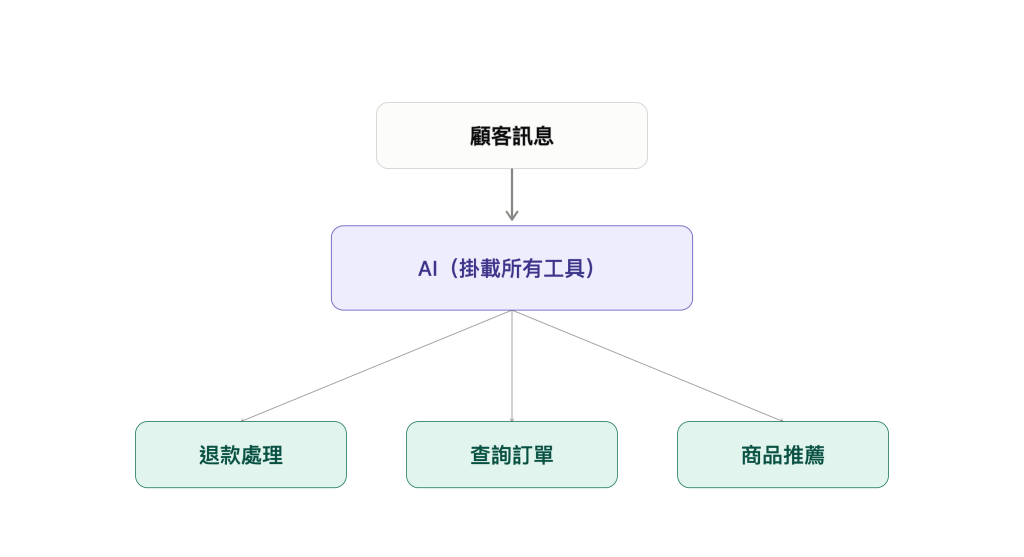
若直接把所有工具掛載到同一個模型節點,由模型自行決定呼叫時機,系統便無法在執行前把關參數完整性。如下圖所示,當顧客只說「我要退貨」而未提供單號時,模型仍可能嘗試呼叫退款函式,導致敏感操作在資料不足時被誤觸發。
要避免這種狀況,關鍵在於落實語意理解與流程控制的職責分離。如下圖所示,系統不讓模型直接觸發業務工具,而是拆為「AI 意圖辨識」與「驗證與分流」兩階段:
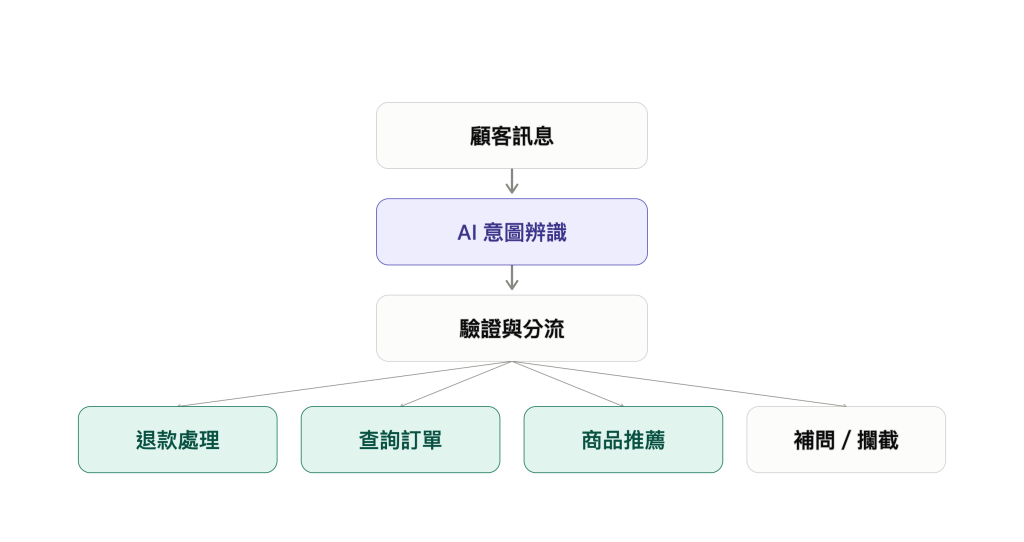
ORD-1234)與資料相依邏輯;再由 Router 決定走向——資料完整且信心充足時放行至業務節點(退款處理、查詢訂單、商品推薦),資料缺漏或格式異常時則導向「補問 / 攔截」。本篇對應的範例程式位於 ai-agent-sample/langgraph/langgraph-pydantic-intent-routing。
我們先把系統所支援的功能,定義為 意圖(Intent),讓模型從中判斷使用者的對話意圖:
order_status:查詢配送與訂單狀態refund:申請退貨或退款product_advice:商品推薦與購物諮詢unsupported:超出支援範圍(例如詢問客服電話、非商城相關問題)在 src/langgraph_pydantic_intent_routing/models.py 中使用 Pydantic 定義 Intent
from enum import StrEnum
from pydantic import BaseModel, ConfigDict, Field

class Intent(StrEnum):
    ORDER_STATUS = "order_status"      # 查詢配送
    REFUND = "refund"                  # 申請退款
    PRODUCT_ADVICE = "product_advice"  # 商品諮詢
    UNSUPPORTED = "unsupported"        # 超出支援範圍
後續的 Router 要做安全分流,還需要知道模型的判斷把握度、對話中是否包含單號,以及當前資訊是否充足。
因此,我們定義 IntentDecision 作為模型分析後的結構化決策契約,規定模型必須統一回傳這份契約所定義的欄位:
intent:使用者意圖,型別為 Intent 枚舉,限制模型只能在支援的 4 種功能中選擇。confidence:判斷信心度(0.0 ~ 1.0),供 Router 判定是否達到放行門檻。order_id:從對話中抽取的訂單編號,以正則表示式 ^ORD-\d{4}$ 約束格式。needs_clarification:布林值,由模型標記當前資訊是否不足、是否需要向顧客補問。class IntentDecision(BaseModel):
"""模型分類結果的結構化契約"""
model_config = ConfigDict(extra="forbid")
intent: Intent = Field(description="使用者意圖,只能從枚舉中選擇")
confidence: float = Field(ge=0, le=1, description="信心度 0.0 ~ 1.0")
order_id: str | None = Field(
default=None,
pattern=r"^ORD-\d{4}$",
description="訂單編號,格式必須為 ORD-1234",
)
needs_clarification: bool = Field(description="是否需要向顧客補問資料")
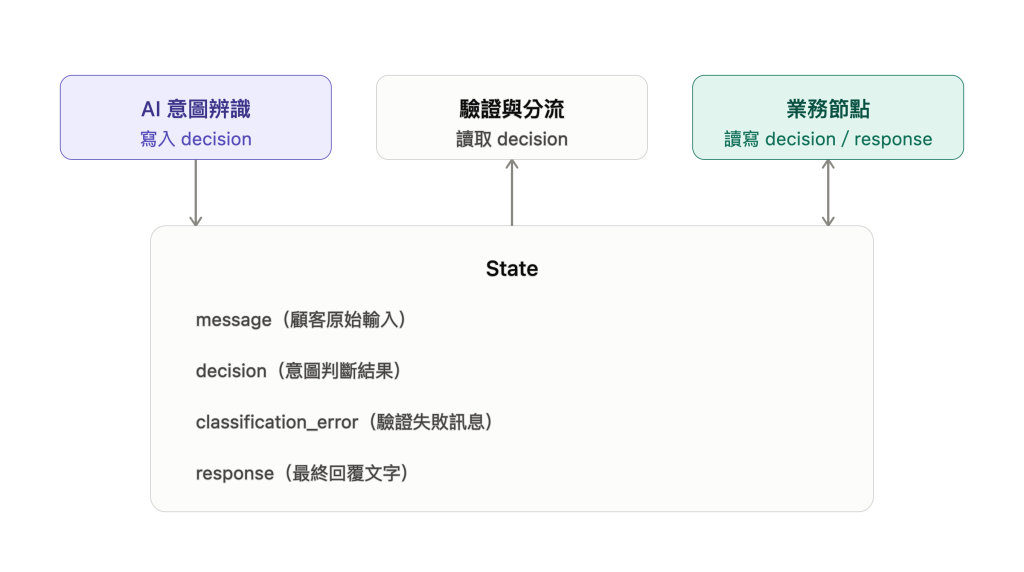
除了模型回傳的決策契約,各節點在 LangGraph 中不直接互相傳遞參數,而是透過共享的 State 傳遞資料。在我們的客服分流情境中,State 負責記錄從輸入到輸出的完整生命週期:
class State(BaseModel):
    model_config = ConfigDict(extra="forbid")

    message: str = Field(description="顧客說的話(原始輸入)")
    decision: IntentDecision | None = None          # 模型判斷出的意圖(驗證成功時填入)
    classification_error: str | None = None         # 驗證失敗時記錄的錯誤訊息
    response: str = ""                              # 最終要回覆給顧客的文字
message:流程起點收到的顧客原始文字(例如:「我要退貨 ORD-1234」)。decision:存放模型產生的 IntentDecision。模型分類通過驗證後填入此處,供後續 Router 判斷分流路徑,以及退款或查單節點直接讀取單號,不必重複呼叫模型。classification_error:若模型輸出格式損毀或 Pydantic 驗證失敗,將錯誤訊息記在這裡,讓 Router 能直接導向人工客服降級處理。response:最後由退款、查單、推薦或補問等節點寫入要回覆給顧客的最終文字。定義好 State 之後,我們實作第一個 Graph 節點 classify_intent。它的任務是讀取顧客輸入(state.message),呼叫模型進行結構化意圖分析,並將驗證後的 IntentDecision 寫入 State 的 decision 欄位中:
structured_model = model.with_structured_output(IntentDecision)

def classify_intent(state: State) -> dict[str, Any]:
    try:
        # 1. 請模型分析顧客文字,並解析為 IntentDecision
        raw_decision = structured_model.invoke(
            [
                SystemMessage(content=SYSTEM_PROMPT),
                HumanMessage(content=state.message),
            ]
        )
        decision = IntentDecision.model_validate(raw_decision)

        # 2. 成功:將驗證後的意圖寫入 State
        return {"decision": decision, "classification_error": None}

    except (OutputParserException, ValidationError) as exc:
        # 3. 失敗(安全防護):若模型輸出格式錯誤,記錄錯誤訊息
        return {"decision": None, "classification_error": str(exc)}
模型輸出可能因隨機性產生不符合 Schema 的 JSON。透過 try-except 捕捉 OutputParserException 與 ValidationError 並寫入 classification_error,可避免程式在解析階段崩潰,將格式異常留給後續 Router 處理。
在前一步中,模型已將顧客輸入解析為結構化的 state.decision。接著由 Python 程式接手,根據 decision 的內容進行把關,決定下一步要把對話導向哪一個節點。
我們在 src/langgraph_pydantic_intent_routing/workflow.py 中實作分流函式 route_after_classification。首先定義所有可能的分流路徑,以及防範模型低信心猜測的門檻:
CONFIDENCE_THRESHOLD = 0.7

Route = Literal[
    "order_status",
    "refund",
    "product_advice",
    "ask_for_details",
    "unsupported",
    "classification_fallback",
]
Route:定義 Router 可以回傳的 6 種目標字串。CONFIDENCE_THRESHOLD = 0.7:當顧客輸入語意模糊時,模型可能給出較低的信心分數。設定 0.7 的門檻,能確保只有在模型信心充足時才放行業務,避免誤觸發敏感操作。接著撰寫分流函式
def route_after_classification(state: State) -> Route:
    # 1. 格式檢查:若模型輸出格式損毀或驗證失敗,立即轉交人工
    if state.classification_error is not None or state.decision is None:
        return "classification_fallback"

    decision = state.decision

    # 2. 完整度與信心檢查:缺少單號或信心不足 0.7,導向補問節點
    if decision.needs_clarification or decision.confidence < CONFIDENCE_THRESHOLD:
        return "ask_for_details"

    # 3. 業務分流:資料完整且有把握,安全放行至對應業務
    if decision.intent is Intent.ORDER_STATUS:
        return "order_status"
    if decision.intent is Intent.REFUND:
        return "refund"
    if decision.intent is Intent.PRODUCT_ADVICE:
        return "product_advice"
    return "unsupported"
這三道檢查的執行順序:
state.classification_error 有值(代表前面 Pydantic 驗證失敗),Router 第一時間攔截並回傳 "classification_fallback"。needs_clarification=True)或模型信心度低於 0.7,回傳 "ask_for_details" 請顧客補充。decision.intent 安全放行進入對應的業務節點。這段分流邏輯完全依賴 needs_clarification 來決定是否補問。但如果顧客說「我要退貨」且未附單號,模型判定為退款、order_id 為 None,卻誤將 needs_clarification 填為 False,Router 就會誤判資料已齊全,直接把對話導向退款節點。
為了避免在 Router 裡針對不同業務重複寫檢查,我們直接在 IntentDecision 加上 @model_validator,把欄位之間的邏輯綁在一起檢查:
    @model_validator(mode="after")
    def require_clarification_for_missing_order_id(self) -> Self:
        # 想退款或查單卻缺少 order_id 時,強制 needs_clarification 必須是 True
        if (
            self.intent in {Intent.ORDER_STATUS, Intent.REFUND}
            and self.order_id is None
            and not self.needs_clarification
        ):
            raise ValueError(
                "訂單查詢或退款缺少 order_id 時,needs_clarification 必須是 True"
            )
        return self
它的作用很單純:只要意圖是查單或退款,而且沒拿到單號,needs_clarification 就強制必須是 True。如果模型輸出「想退款、沒單號、又說不用補問」這種資料,Pydantic 就會直接拋出錯誤,讓 Router 的第一道檢查將流程轉交人工客服,避免缺單號的請求進入退款業務。
有了分類節點、Router 函式與業務節點後,我們在 build_graph() 中將它們組裝成完整的工作流:
def build_graph(model=None):
    builder = StateGraph(State)

    # 1. 註冊所有節點
    builder.add_node("classify_intent", classify_intent)
    builder.add_node("query_order", query_order)
    builder.add_node("prepare_refund", prepare_refund)
    builder.add_node("recommend_product", recommend_product)
    builder.add_node("ask_for_details", ask_for_details)
    builder.add_node("unsupported", unsupported)
    builder.add_node("classification_fallback", classification_fallback)

    # 2. 起點進入分類節點
    builder.add_edge(START, "classify_intent")

    # 3. 使用條件邊(Conditional Edge)掛載 Router
    builder.add_conditional_edges(
        "classify_intent",
        route_after_classification,
        {
            "order_status": "query_order",
            "refund": "prepare_refund",
            "product_advice": "recommend_product",
            "ask_for_details": "ask_for_details",
            "unsupported": "unsupported",
            "classification_fallback": "classification_fallback",
        },
    )

    # 4. 所有出口節點執行完後抵達 END
    for node_name in (
        "query_order",
        "prepare_refund",
        "recommend_product",
        "ask_for_details",
        "unsupported",
        "classification_fallback",
    ):
        builder.add_edge(node_name, END)

    return builder.compile()
透過 Pydantic 驗證與 Router 分流,系統已能確保進入業務節點的資料完整正確。但當顧客缺少單號或需求模糊時,流程不能只是回覆提示訊息,而是需要主動向顧客追問。
在下一篇,我們將讓模型判斷追問時機,並在發出提問後等待顧客回答,補齊資料後接續處理。



 iThome鐵人賽
 看影片追技術